
Step into the world of three-dimensional floor plans, where innovative technology meets architectural design. This comprehensive guide explores the creation, application, and interpretation of 3D floor plans, highlighting their transformative impact across various industries. From real estate marketing to construction planning, we’ll delve into the advantages of 3D visualization and its role in enhancing communication and decision-making throughout the design and construction process.
We’ll also examine the software and techniques used to bring these digital blueprints to life.
This exploration will cover the key features of 3D floor plans, comparing them to traditional 2D counterparts and detailing the software options available. We’ll walk through the creation process step-by-step, providing insights into design elements, technological advancements, and the critical role of accurate measurements. The guide also includes practical examples and FAQs to equip readers with a thorough understanding of this increasingly essential design tool.
Defining 3D Floor Plans
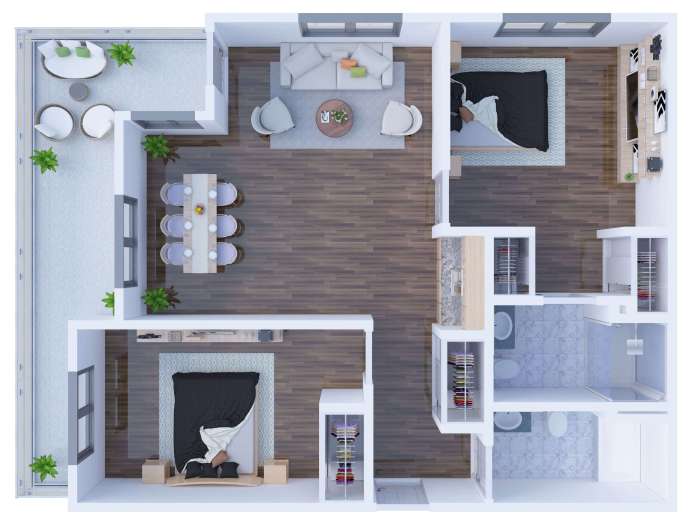
- D floor plans offer a significant advancement over traditional 2D blueprints, providing a more immersive and intuitive way to visualize and design spaces. They move beyond simple line drawings to create realistic, three-dimensional representations of a building’s interior, enhancing communication and collaboration among architects, designers, and clients.
- D floor plans provide a far more comprehensive understanding of a space than their 2D counterparts. The ability to walk through a virtual representation of a building before construction begins allows for earlier identification of potential design flaws and a more informed decision-making process. This ultimately saves time and money, reduces the likelihood of costly rework, and leads to a more satisfying final product.
Types of 3D Floor Plan Software and Their Functionalities
Several software applications cater to the creation of 3D floor plans, each offering a unique set of features and capabilities. These range from user-friendly options ideal for homeowners to sophisticated professional-grade tools with advanced modeling and rendering capabilities. The choice of software often depends on the user’s skill level, project complexity, and budget.
- Home Design Software: Programs like Planner 5D and Sweet Home 3D provide intuitive drag-and-drop interfaces, making them accessible to users with limited experience in 3D modeling. These tools typically offer pre-built objects and templates, simplifying the design process. Their functionalities are focused on basic design, furniture placement, and basic material selection.
- Professional CAD Software: Applications like Autodesk Revit and ArchiCAD are industry-standard tools used by architects and designers. These programs offer advanced features such as parametric modeling, allowing for dynamic changes to the design, and precise control over every aspect of the building. They also incorporate features for structural analysis, building information modeling (BIM), and collaboration tools for large projects.
- Specialized 3D Modeling Software: Software like SketchUp and Blender are powerful tools that can be used for creating highly detailed 3D models. While they require a steeper learning curve, they offer unparalleled flexibility and control for creating highly customized and visually stunning floor plans. They often integrate with other software for rendering and animation.
Creating a 3D Floor Plan: A Step-by-Step Guide
The process of creating a 3D floor plan involves a series of steps, from initial conceptualization to the final rendered image. Careful planning and execution at each stage ensure an accurate and visually appealing result.
- Initial Design and Measurements: Begin by gathering accurate measurements of the space. This includes the dimensions of walls, doors, windows, and any other significant features. Sketch a basic 2D floor plan as a starting point, noting the placement of key elements.
- Software Selection and Setup: Choose a 3D floor plan software application that aligns with your skills and project requirements. Familiarize yourself with the software’s interface and tools before starting the modeling process.
- 3D Modeling: Import the 2D plan into the software or create the floor plan directly in 3D. Begin by defining the walls, floors, and ceilings of the space. Add doors, windows, and other architectural features. Pay attention to accurate dimensions and positioning.
- Furniture and Fixture Placement: Add furniture and fixtures to the space, ensuring they are scaled appropriately and placed realistically. This allows for a better understanding of the space’s functionality and flow.
- Material Selection and Texturing: Choose materials and textures for walls, floors, and furniture to enhance the realism of the model. This can include selecting different types of flooring, wall coverings, and paint colors.
- Lighting and Rendering: Add lighting to the model to enhance its visual appeal and simulate real-world conditions. Use rendering techniques to create high-quality images or animations of the finished design.
Interpreting Floor Plans
Understanding 3D floor plans effectively requires more than just visual appreciation; it necessitates a clear understanding of the symbols, conventions, and spatial relationships depicted. This section will guide you through the process of interpreting floor plans, enabling you to extract meaningful information about the space represented.
Floor Plan Symbols and Conventions
A standardized set of symbols and conventions is used in floor plans to represent various features and elements within a building. Familiarizing yourself with these symbols is crucial for accurate interpretation. The following table provides a key to some common symbols:
| Symbol | Meaning | Example | Notes |
|---|---|---|---|
| ● (Filled Circle) | Electrical Outlet | Typically found along walls | Variations exist to indicate different outlet types. |
| ∕ (Square) | Light Fixture | Located on ceilings or walls | Size and shape may indicate fixture type. |
| | (Vertical Line) | Door Swing | Indicates the direction a door opens. | Often accompanied by a door symbol. |
| → (Right Arrow) | Direction of movement/traffic flow | Used in egress plans to show escape routes. | Can indicate the flow of people or goods. |
| [Image of a bathtub symbol] | Bathtub | Found in bathroom areas. | Shape and size can vary depending on the specific tub. |
| [Image of a toilet symbol] | Toilet | Located in bathrooms. | Usually depicted as a simple Artikel. |
| [Image of a sink symbol] | Sink | Found in bathrooms and kitchens. | Shape may vary depending on the type of sink. |
Scale and Dimensions
Scale and dimensions are fundamental to interpreting floor plans accurately. The scale indicates the ratio between the drawing’s dimensions and the actual dimensions of the space. For instance, a scale of 1:50 means that 1 unit on the drawing represents 50 units in reality. Dimensions are typically indicated numerically on the plan, providing precise measurements of walls, rooms, and other features.
Misunderstanding the scale can lead to significant misinterpretations of the space’s actual size and proportions. For example, a room appearing small on a plan with a 1:100 scale will be significantly larger than a room of the same size on a 1:50 scale plan.
Identifying Key Features and Spatial Relationships
Identifying key features and understanding their spatial relationships is critical for comprehending the overall layout and functionality of the space. This involves recognizing rooms, hallways, doors, windows, and other elements and understanding how they relate to one another. For example, analyzing the proximity of a kitchen to a dining area helps understand the intended flow of movement within the home.
Similarly, observing the placement of windows in relation to rooms provides insights into natural light and ventilation. Careful examination of the floor plan reveals the design’s logic and functionality.
In conclusion, 3D floor plans represent a significant advancement in architectural and design visualization. Their ability to provide immersive and interactive experiences greatly benefits various sectors, streamlining workflows and enhancing communication. From initial concept to final construction, the clarity and detail afforded by 3D models are invaluable. As technology continues to evolve, the capabilities and applications of 3D floor plans are sure to expand further, solidifying their place as an indispensable tool for architects, designers, and developers alike.
Mastering their creation and interpretation is key to navigating the future of design and construction.
Essential FAQs
What are the limitations of 3D floor plans?
While powerful, 3D floor plans can be computationally intensive to render, requiring specialized software and potentially high-end hardware. Accuracy depends heavily on the input data and the skill of the user. Furthermore, they may not always perfectly represent real-world materials and textures.
How much does 3D floor plan software cost?
Costs vary widely depending on features, functionality, and licensing. Free options exist with limited features, while professional-grade software can range from subscription-based services to one-time purchases in the hundreds or thousands of dollars.
Can I create a 3D floor plan from a 2D blueprint?
Yes, many software packages allow you to import 2D plans as a base for creating a 3D model. This can significantly speed up the design process.
What file formats are commonly used for 3D floor plans?
Common formats include .SKP (SketchUp), .FBX, .OBJ, and various proprietary formats specific to individual software applications.


